SterJo Firefox Passwords (Reveal Saved Passwords in Mozilla Firefox)
SterJo Firefox Passwords discovers and displays usernames and passwords stored by Mozilla Firefox. The tool shows the associated website URL, timestamps (created/modified/last used) and supports export to HTML and KeePass-compatible CSV for backup or migration.
How SterJo Firefox Passwords Works
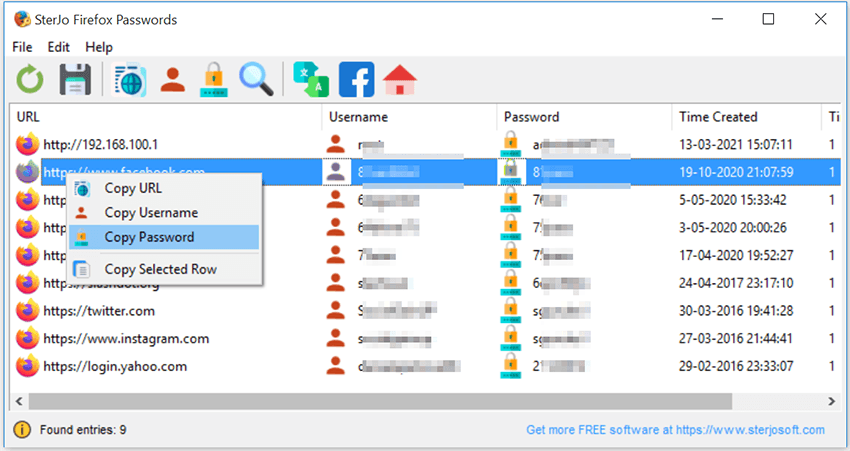
When Firefox offers to save login details, those entries are stored in the user profile. SterJo Firefox Passwords reads the local Firefox profile for the currently logged-in Windows user, attempts to decrypt stored credentials (where possible) and displays them in a clear table showing URL, username, password and timestamps. You can export results to HTML or CSV for safekeeping or to import into password managers.
Download Portable VersionRelated tools: Chrome Passwords, Facebook Password Finder, see all products.
System Requirements
SterJo Firefox Passwords runs on Windows XP, Vista, 7, 8, 10 and Windows 11 where Mozilla Firefox (32-bit profile support) is installed. The tool runs offline and does not upload decrypted credentials to any server.
Version History
Version 2.0: UI changes and removed .OCX dependencies.
Version 1.8: Fixed minor bug when selecting a custom profile folder.
Version 1.7: Added support for Firefox ESR 32-bit and minor changes.
Version 1.6: Minor changes.
Version 1.5: Small bug fixed.
Version 1.4: Added export to HTML (.html) and KeePass file (.csv). Now shows the time when passwords were created, modified and last used.
Version 1.3: Bug fixed: Decryption failed on some of the latest Firefox versions.
Version 1.2: Bug fixes.
Version 1.1: Multi-language support.
Version 1.0: Initial release.
Frequently Asked Questions
Can this tool reveal passwords saved by Firefox?
Yes — it reads saved credentials from the Firefox profile of the current Windows user and displays them when decryption is possible.
Will the recovered passwords be uploaded anywhere?
No. SterJo tools operate offline and do not transmit recovered credentials to external servers.
What happens if the Firefox profile is deleted?
If the profile (containing the saved passwords) has been deleted or overwritten, recovery is not possible unless you have a separate backup of the profile files.
Can this recover passwords from another Windows account?
Not without access — the tool can only access the currently logged-in user's browser profiles unless you manually point it to a profile and have the necessary permissions.